 The reason I built Speed/Limit is simple: I hate accidental speeding tickets.
I’ve been driving for around 40 years, across multiple countries. I don’t intentionally speed. But a handful of times over the years, I’ve been caught out – and every time it’s infuriating.
Not because of the fine, but because it feels like being punished for something you never meant to do.
In every case, the cause was the same: either the speed limit signage wasn’t obvious (or wasn’t there at all), or I simply didn’t notice that my speed had crept up. There was no intent – just a momentary lack of awareness.
And yet, the outcome is the same as if I’d deliberately ignored the law.
Why Existing Solutions Didn’t Solve the Problem
Yes, Google Maps, Apple Maps, Waze, and other navigation apps display speed limits and warnings. But there are some real limitations:
-
You often have to be actively navigating to a destination before speed data appears.
-
Relatively small visual warnings are easy to miss when you’re concentrating on the road.
-
Audio alerts are frequently too quiet, too polite, or drowned out by music or calls.
- If the speed limit is wrong or missing, you have no opportunity to update it.
Some newer cars offer speed limit alerts or camera-based sign recognition – but millions of drivers are in older vehicles, hire cars, or cars without those features. And even then, built-in systems vary widely in quality and configurability.
The problem isn’t a lack of speed limit data.
The problem is not being alerted loudly and clearly enough at the exact moment it matters.
So I asked myself one very specific question:
“What would a speed warning system look like if it was genuinely impossible to ignore?”
That question became Speed/Limit.
How Speed/Limit Works
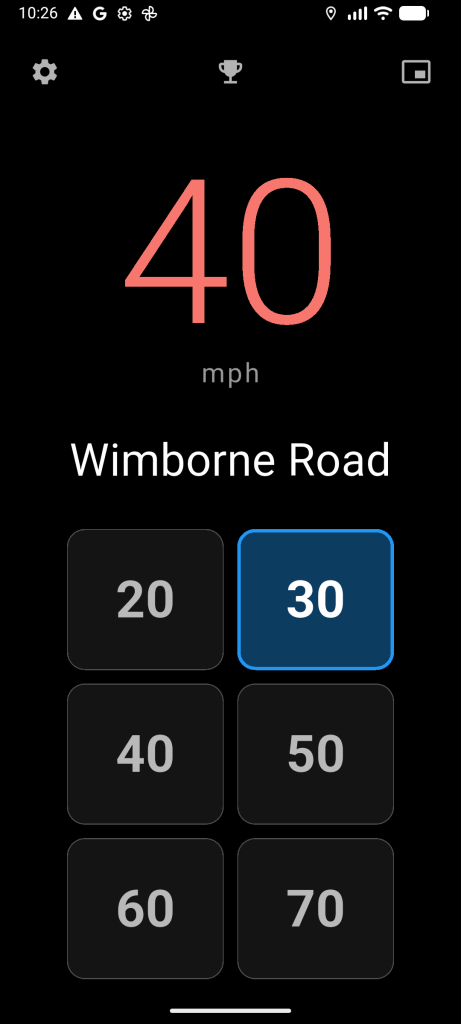
Speed/Limit continuously monitors your GPS speed and determines the legal speed limit for the road you’re currently on. It uses road and speed limit data from OpenStreetMap (OSM) – a free, global mapping database maintained by a worldwide community of contributors.
The benefit of this approach is simple: global coverage, not just major roads or a handful of countries.
When you exceed the speed limit by more than 5% (fully configurable), Speed/Limit triggers a combination of alerts designed to break through distraction:
-
Visual alerts flash the screen in bright red and white, ensuring you notice even with a quick glance.
-
Audio alerts use your phone’s alarm audio stream, cutting through music, podcasts, and even phone calls.
-
Haptic feedback adds vibration, creating a multi-sensory warning that demands attention.
This isn’t a subtle nudge. It’s a clear, unmistakable signal that you’re driving faster than the law allows – right now.
What Makes Speed/Limit Different
Speed/Limit isn’t a navigation app, and it doesn’t try to replace one. It’s designed to complement whatever setup you already use.
Here’s what sets it apart:
Floating Overlay Mode (Android)
Get alerts without switching apps.
Speed/Limit can run as a floating overlay on Android, sitting above Google Maps, Waze, or any other app. When you exceed the speed limit, the overlay automatically appears. When you slow down, it gets out of the way.
You don’t have to interact with it constantly – it’s there when you need it, invisible when you don’t.
Country-Aware Intelligence
Drive anywhere, without manual setup.
The app automatically detects the country you’re in and switches between miles per hour (mph) and kilometers per hour (km/h). It also understands country-specific speed limit conventions, making it genuinely international.
This is particularly useful for road trips, hire cars, or cross-border driving.
Smart Corridor Caching
Fast, responsive, and data-efficient.
Once Speed/Limit queries speed limit data for a stretch of road, it caches that information for your journey. This reduces repeated lookups, improves responsiveness, and keeps mobile data usage low.
It simply works in the background without hammering APIs or draining your battery.
One-Click OpenStreetMap Contributions
Fix the problem instead of complaining about it.
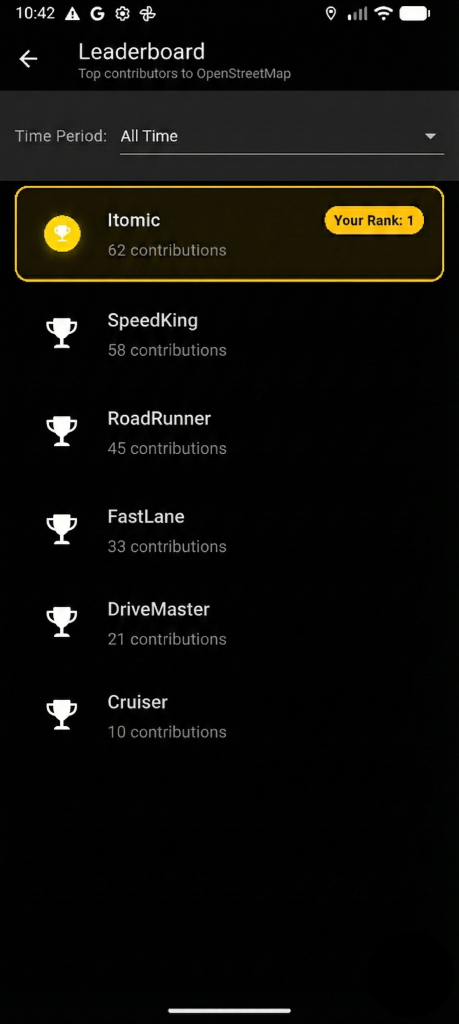
Because Speed/Limit uses OpenStreetMap, you can contribute back to the same data that powers the app.
If you encounter a missing or incorrect speed limit, you can add or correct it with a single tap – right where you are. Your update doesn’t just help you; it helps every driver who follows.
Instead of saying “this data is wrong,” you can make it right. The global OSM community thanks you!
Optional Premium Features
For drivers who want more control, Speed/Limit offers a premium tier that includes:
-
Voice announcements (e.g. “Speed limit is now 40”)
-
Customisable alert thresholds
-
Text-to-speech options
-
An ad-free experience
Importantly, the core function – monitoring your speed and alerting you when you exceed the limit – remains completely free.
Designed for Real-World Driving
Every design decision in Speed/Limit follows one simple rule:
if it becomes annoying, people turn it off – and a safety feature that’s turned off helps no one.
With that in mind:
-
Alerts only activate above 20 mph (or 30 km/h), so you won’t be bothered while walking or manoeuvring.
-
Alerts have a built-in cooldown, preventing constant beeping in borderline situations.
-
The interface uses a minimalist black background with large white numbers for maximum readability and minimal glare.
The goal is awareness, not punishment.
The Bottom Line
After 40 years of driving, I’ve learned that avoiding speeding tickets isn’t about driving slower – it’s about being more aware, especially on unfamiliar roads or in unfamiliar cars.
Speed/Limit gives you that awareness through multiple channels: visual, audio, and haptic. It’s intentionally loud, deliberately clear, and designed to work alongside the apps and vehicles you already use.
If you’ve ever been surprised by a speeding ticket, Speed/Limit was built for you.
The app is available now on the Google Play Store, with iOS support coming soon. Try it free, and see whether it removes that lingering uncertainty from your driving – because the best speeding ticket is the one you never get.
Speed/Limit is available for Android on the Google Play Store. For more information, visit https://play.google.com/store/apps/details?id=com.speedlimit.app or contact support@itomic.com.au.