

Phishing is a type of scam where someone pretends to be a person, company or service you trust, usually to persuade you to click a link, open an attachment, share information or make a payment.
The goal is often to steal passwords, financial details or access to an account. Sometimes the immediate aim is simply to start a conversation and build trust. Either way, the safest approach is to pause before acting.
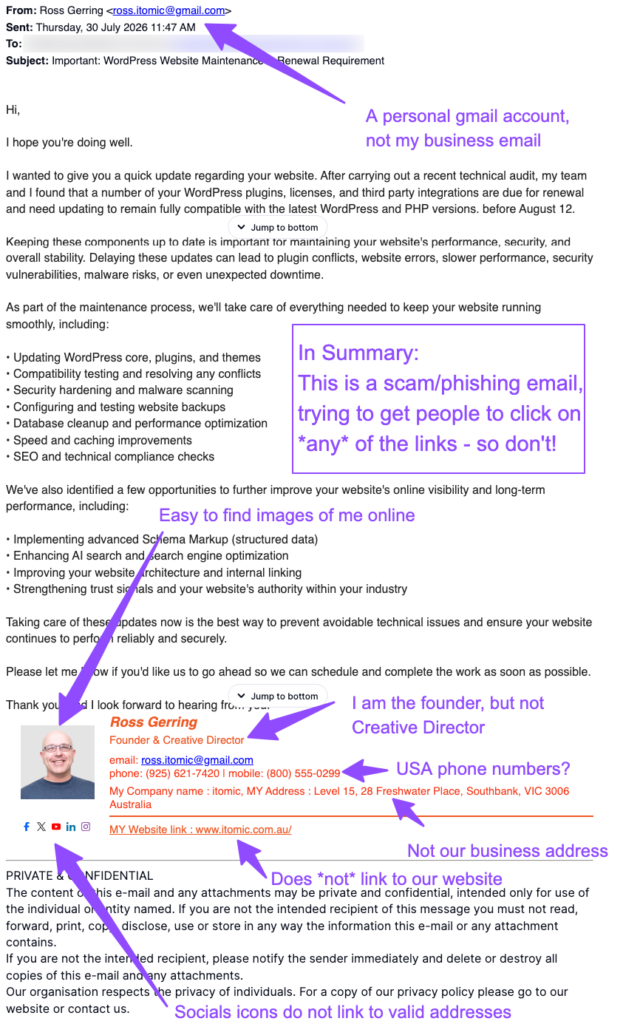
The example screenshot is a phishing email posing as me, Ross Gerring. It claims that WordPress updates, licences and integrations urgently need attention, then encourages the recipient to get in touch and follow links in the email.
This particular attempt is not very good! It contains several obvious warning signs, and its ability to deceive could have been much stronger. But that is exactly why it is useful as a learning example.
Warning signs in this email
- The sender address is a personal Gmail account, rather than a genuine business address. A legitimate provider would normally contact clients from its own company domain.
- The signature uses the name and photo of a real person (me!), but the details do not line up. This is a common tactic: scammers can easily copy names, photographs and job titles from public websites and social media.
- The phone number appear to be a US number, despite the signature claiming an Australian business address. The listed address also does not match the real business address of Itomic.
- The email includes a website link, but it does not lead to the genuine business website. Its social-media icons also fail to link to valid company profiles. Never assume a link is safe because it looks familiar. Hover over it, or on a phone press and hold where appropriate, to check where it actually leads before clicking. If in any doubt whatsoever – DON’T CLICK!
- The message creates urgency by referring to upcoming renewals and a deadline. Urgency is one of the oldest phishing techniques. It is designed to make us act quickly, before we have time to check whether the request is genuine.
- Other clues include a generic greeting, broad technical claims that are difficult to verify, and a message that sounds plausible without containing the specific detail a real provider would be likely to know.
How to spot a phishing email
- Look beyond the display name. Check the full sender address, including the domain after the
@symbol. Small spelling changes, extra words and free email accounts can all be warning signs. - Be cautious with unexpected links and attachments. A convincing-looking button or logo can still lead to a fake sign-in page or download something harmful.
- Treat pressure with care. Requests framed as “urgent”, “final notice” or “act now” deserve extra scrutiny, particularly if they involve passwords, money, account access or sensitive information.
- Watch for inconsistencies. A mismatch between a sender’s address, phone number, company name, job title, branding, links or writing style can reveal a scam.
- Verify independently. Rather than replying to the email or using its links, contact the organisation through a phone number or website you already know is genuine. If the message claims to be from a colleague or supplier, use an established contact method to ask whether they sent it.
- Do not share passwords, verification codes or banking information in response to an email. Legitimate organisations should not pressure you to provide these details this way.
Phishing is changing quickly
Phishing activity is increasing in volume, speed and apparent quality. AI can help criminals create more polished wording, tailor messages to particular industries, and produce emails that look more convincing at first glance.
That does not make AI inherently bad. AI is also used for security tools, fraud detection, accessibility and many useful everyday tasks. The important point is that we should expect scams to become more persuasive and stay alert as they evolve.
The best defence is not technical knowledge alone. It is the habit of pausing, checking and verifying before you click, reply or share information.
If you use Gmail, Google explains how to avoid and report phishing messages here: Report phishing emails in Gmail.
Stay alert, stay safe, and when in doubt, do not click.